XA Sub Manager

XA Sub Manager

Run Your Whole FFXIV Fleet on Autopilot From One Window

v— downloads
Automation Multi-Account 2FA Support Windows & Linux (Wine)
XA Free to Use • Closed Source

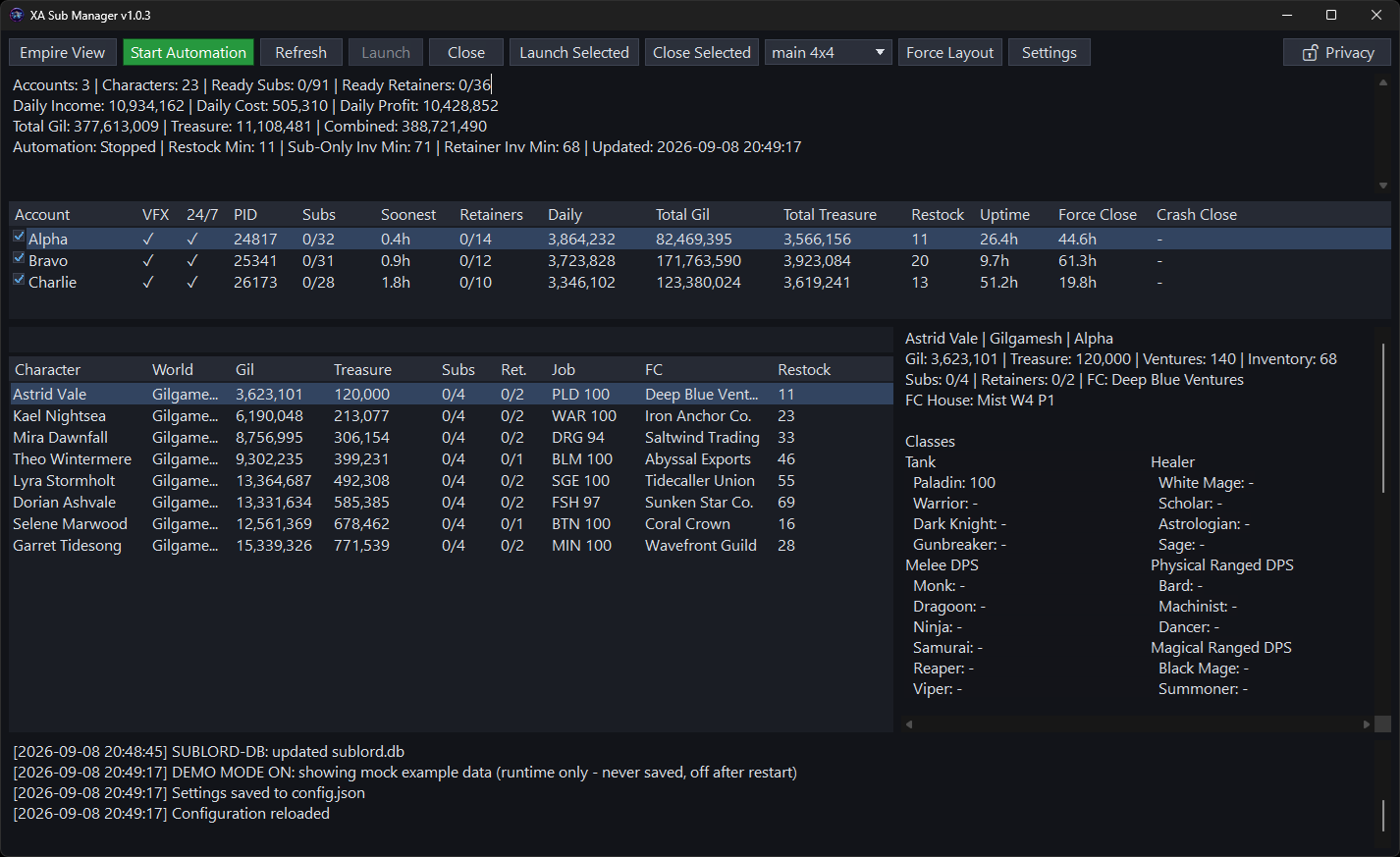
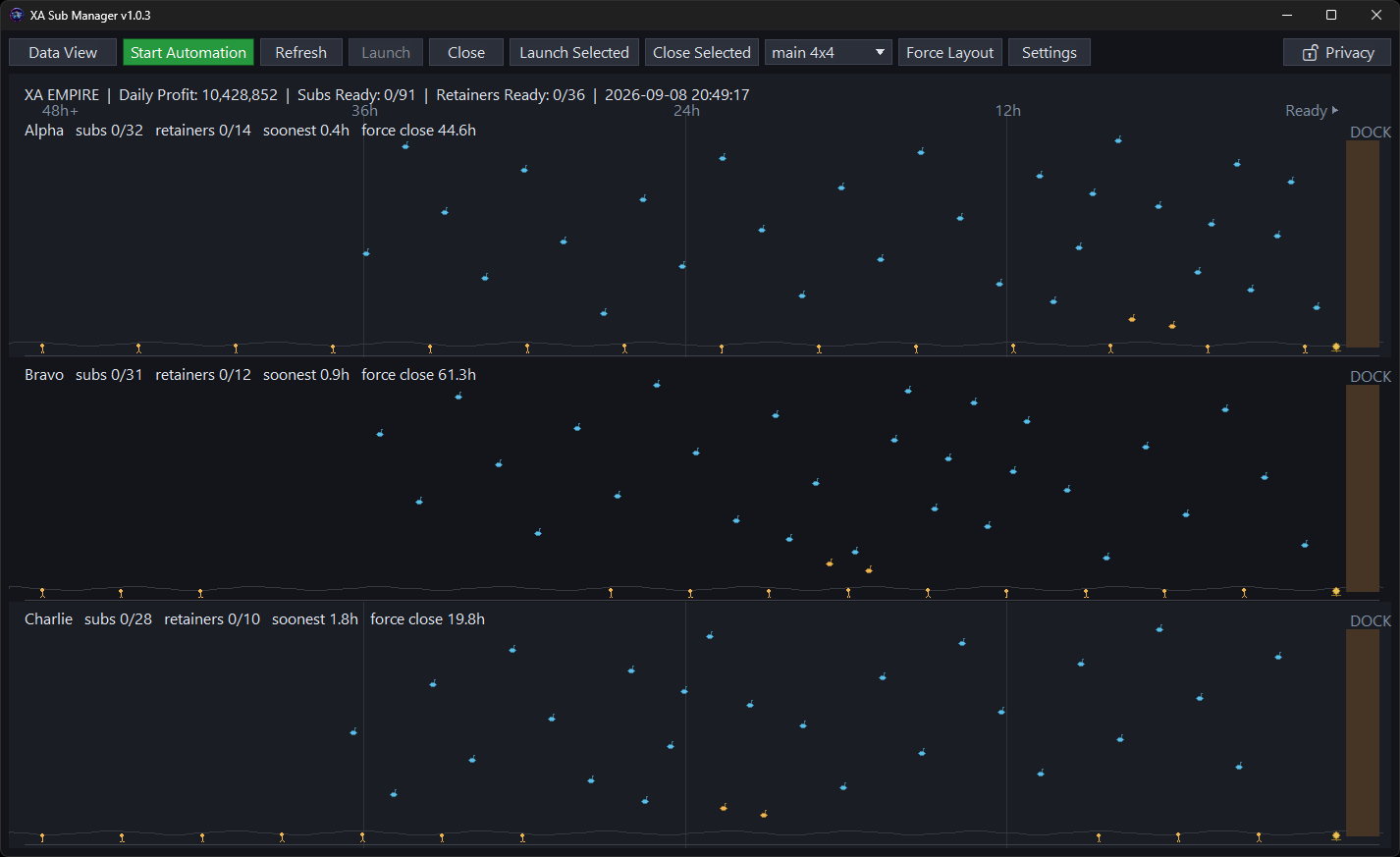
Click to enlarge • Data View & Empire View

Download XA Sub Manager

Version • Released

SHA-256 checksums

Current Windows releases are unsigned. Download only here and compare the SHA-256 above before deciding whether to continue past a SmartScreen or Unknown publisher prompt. A Defender malware/behavior verdict is different: do not bypass it or add an exclusion; report the release version, detection name, and SHA-256 to XA.

Latest Release

XA Sub Manager

Loading release notes…

Updates

New versions are published on this page. Updating keeps everything you've set up: run the new installer over your existing install (or extract the new zip over the old folder) — your config.json, window layouts, and history sit beside the app and are never overwritten.

Previous Versions

The latest release above is recommended for current fixes and compatibility.

These retained installers and Windows or Linux/Wine archives are the original published builds. Use an older version only when you specifically need to roll back.

Loading retained releases…

Overview

XA Sub Manager watches and drives your fleet of FFXIV accounts from one compact window. It reads each account's AutoRetainer / XA Database / Lifestream data — showing every character, submarine, and retainer at a glance — and, when you turn automation on, launches, logs in (including 2FA), arranges, and closes clients on a schedule so your submarines and ventures keep cycling without you babysitting them.

It is a single self-contained XA Sub.exe — no .NET or other runtime to install, no telemetry. Automation is off by default; nothing launches or closes until you press Start Automation.

Key Features:

  • Multi-account dashboard — characters, subs & retainers at a glance
  • Duplicate-safe, cancelable sequential launch / login (incl. 2FA) / arrange / close automation
  • Visual multi-monitor window-layout editor & dynamic grid
  • Animated Empire View of every submarine by ETA and rank
  • Read-only UNC network accounts with no launcher or client control
  • Optional hard-set maintenance windows with a patch-first managed-account sweep, then approved-DLL or Dalamud Stable resume
  • Optional Windows tray minimize with one-click restore, Open/Exit menu and single-instance relaunch
  • Treasure valuation & independent submarine/retainer crash timers
  • Optional screenshots for inactivity or unresponsive-window closes
  • Optional token-gated web dashboard with live client video
  • Discord / Pushover notifications and crash logging

Technical Details

Local & Private:

  • • Reads plugin data, never modifies it — it does launch, arrange, and close local-account game clients (that's the point of automation)
  • • Network accounts are data-only; remote XA Database files are copied to disposable local snapshots instead of opened live through SMB
  • • Closing cancels XA Sub's own pending network reads and releases its handles without disconnecting the shared Windows network session
  • • No telemetry, no account, no login — nothing is uploaded
  • • Optional web dashboard is off by default and binds to 127.0.0.1
  • • Outbound traffic only for configured Discord/Pushover notifications, software-update checks, the optional Aethertek maintenance schedule, and post-patch Dalamud Stable availability checks
  • • Loaded or saved config.json is locked to an owner-only ACL; 2FA secrets can live in Windows Credential Manager instead of the file
  • • Privacy toggle masks names and financial values for shareable screenshots

⚠️ Exposing the web dashboard beyond this PC requires a token; for remote access put it behind a TLS reverse proxy / firewall allow-list and use a long random token. Forwarding the port to the open internet without those is unsafe.

Data Sources:

  • • AutoRetainer configurations
  • • XA Database SQLite files
  • • Lifestream housing data

Requirements:

  • • Windows 10/11 x64, or a Linux Wine prefix (experimental)
  • • XIVLauncher with the relevant plugins (AutoRetainer, etc.) configured per account
  • • For 2FA: XIVLauncher's "Enable XL Authenticator app/OTP macro support" turned on
  • • For window resizing/layout: run FFXIV in windowed mode

Comprehensive Features

Multi-Account Dashboard

  • • Summary cards & accounts list
  • • Remote UNC profiles appear as read-only Data and Empire accounts
  • • Cross-account character search & sort
  • • Total gil/treasure plus independent submarine & retainer crash timers
  • • Details pane: jobs, currencies, subs, retainers
  • • Configurable row highlights

Automation

  • • Duplicate-safe sequential launch → login → arrange → close; an active manual launch batch can be canceled
  • • Per-account manage toggle & scheduled hours
  • • Malformed scheduled-hour profiles stay disabled instead of becoming unrestricted
  • • Independent force-crash recovery with optional diagnostic screenshots
  • • Automatic FFXIV patch handling (opt-in)

2FA & Launch Flow

  • • TOTP from Windows Credential Manager
  • • Delivered to XIVLauncher's OTP endpoint
  • • Autologin validation before launch
  • • Stuck-launcher recovery

Window Management

  • • Visual multi-monitor layout editor
  • • Drag, snap, capture from live windows
  • • Dynamic grid or run-minimized modes
  • • Per-account topmost / activate rules
  • • Optional tray minimize + single-instance relaunch (Windows)

Empire View & Monitoring

  • • Animated fleet plot by ETA & rank
  • • Retainer camps & separate submarine/retainer crash-close timers
  • • Sublord DB history (Python-compatible)
  • • Crash logs & minidumps

Remote & Comfort

  • • Web dashboard: stats, controls, live client video
  • • Discord / Pushover notifications
  • • Daily, weekly, or manual update notifications
  • • Optional Aethertek Unix-time maintenance hold with remembered patch-sweep/standby identity, selectable cooldown, and a clickable missing-DLL guide state
  • • 13 themes + privacy toggle
  • • UI scale 100–300% for hi-res monitors

Web Dashboard (Remote Access)

An optional embedded web server gives you a browser dashboard plus a control API — watch stats and start/stop automation, enable/disable local accounts, and launch/close local clients from a phone or another PC. Off by default.

Enable it in Settings → Web Server, save, and restart XA Sub Manager for listener, port, or token changes to take effect. Then open http://127.0.0.1:4269/, enter your token, and you get summary cards, Accounts (controls for local profiles; read-only statistics for network profiles), Characters, an Empire timeline, and a Clients tab with live low-res video of each running client.

  • Every API call needs the token (constant-time compared)
  • Cross-origin requests rejected, security headers set
  • Until you set a token, the API is disabled
  • LAN binding refuses to start without a token

Installation & Usage

Windows Installer

  1. Download and run the installer
  2. Accept the license agreement
  3. XA Sub Manager installs per-user (no admin needed) with a Start Menu entry
  4. Launch it — your accounts appear; automation stays off until you start it

Windows Portable

  1. Download the portable .zip
  2. Extract anywhere you like
  3. Run XA Sub.exe

Linux (via Wine)

  1. Download the Linux / Wine .zip
  2. Edit run-linux.sh to point at your game's Wine prefix
  3. chmod +x run-linux.sh && ./run-linux.sh

Experimental — same exe under Wine; see the bundled README-LINUX.md for limitations and the same-prefix detection caveat.

First-Run Setup

Single account, default XIVLauncher install? No editing needed. On first launch XA Sub seeds a default Main account and auto-detects your platform's default pluginConfigs folder (%APPDATA%\XIVLauncher\pluginConfigs on Windows, ~/.xlcore/pluginConfigs under Wine/XLCore) — your data appears on the very first run.

For more accounts, open Settings and either Import Settings… (uses validation built into XA Sub to pull supported keys from an existing Auto-AutoRetainer config_*.json, rejects invalid fields before changing state, and shows the exact reason), use Export Settings… for an exact-byte atomic snapshot of the active config, or add each account's pluginConfigs path. Local accounts also take a game launcher. For another computer's UNC folder, tick Network account - data only; launcher and automation fields are disabled while its Data and Empire statistics remain visible. Every path field has a browse button. Nearly every option lives in the four-column Settings window with hover help on each field. Import and Export start in the normal config directory and report an explicit success or failure result. An exported file can be imported without requiring a separate config.json.example beside the executable.

config.json lives next to XA Sub.exe. Updates never touch it — your config, window layouts, and history are preserved. The running version is always shown in Settings → General and can optionally be added to the title bar.

FAQ

Does it modify my game or get me banned?

It doesn't modify plugin data, but it does automate the game client (launch/login/close). Automating FFXIV can violate the User Agreement and risk your account — see the disclaimer below. Automation is off until you start it.

Do I have to edit config.json before the first run?

No — with a single default XIVLauncher install your data shows up immediately. Edit it (or use Import Settings) only to add more accounts or change defaults.

Is there a native Linux build?

No — it's a Windows app that runs under Wine on Linux, inside the same prefix you use for XIVLauncher + FFXIV. See the Linux install steps above.

Windows warned me about the app.

Current official Windows releases are unsigned, so SmartScreen can show an Unknown publisher or reputation prompt. Download only from this official page and compare the SHA-256 above before deciding whether to continue. A Defender Antivirus malware or behavior verdict is different: do not bypass it or add an exclusion. Leave that artifact quarantined and report the release version, detection name, and SHA-256 to XA.

Can I change the web dashboard port?

Yes — Settings → Web Server, or set WEB_SERVER_PORT (default 4269).

Where's the version?

Always in Settings → General → Version. The adjacent Title option adds it to the title bar.

Is the source code available?

No. XA Sub Manager is proprietary, closed-source software distributed as compiled binaries. The GitHub repository hosts the project README and license only — downloads come from this page.

Found a bug or have a request?

Reach us on Discord at discord.gg/g2NmYxPQCa.

Licensing & Disclaimer

XA Sub Manager is free to use, closed-source proprietary software. © 2026 XA / Aethertek — all rights reserved. Powered by members of the community.

Use of the software is governed by its End User License Agreement, shown during installation and included with every download. In short:

  • Free for personal, non-commercial use on your own devices
  • No redistribution or re-hosting — link people to this page instead
  • No reverse engineering, modification, or derivative works
  • Provided as-is, without warranty of any kind

⚠️ Disclaimer: use of third-party tools and automation may violate the FINAL FANTASY XIV User Agreement and can put your account at risk, including suspension or termination. You are solely responsible for how you use this software.

XA Sub Manager includes third-party components, each under its own license — see the Third-Party Notices. Not affiliated with SQUARE ENIX. FINAL FANTASY XIV is a registered trademark of SQUARE ENIX Holdings Co., Ltd.

Download History

Loading download history…